
API keys
An API key lets your own code talk to Wujud: run an AI tool from a script, pull results into a build, check your credit balance from a dashboard. A key belongs to one workspace and carries only the scopes you give it.
Want an AI assistant like Claude to use Wujud for you? The same key works there too, see Connect an AI assistant.
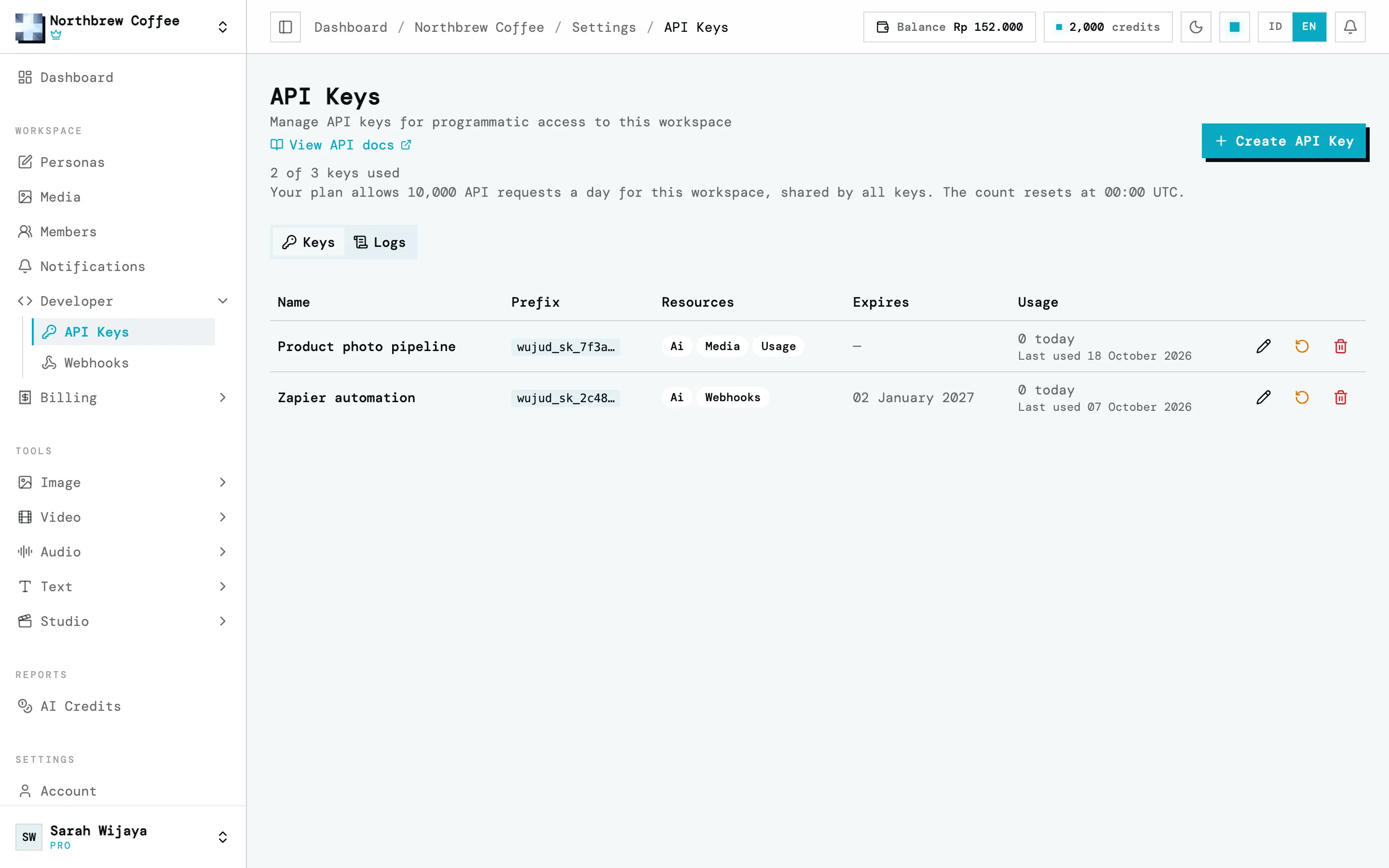
Find them under Developer then API Keys in the sidebar.
Create one
Section titled “Create one”-
Press Create API Key.
-
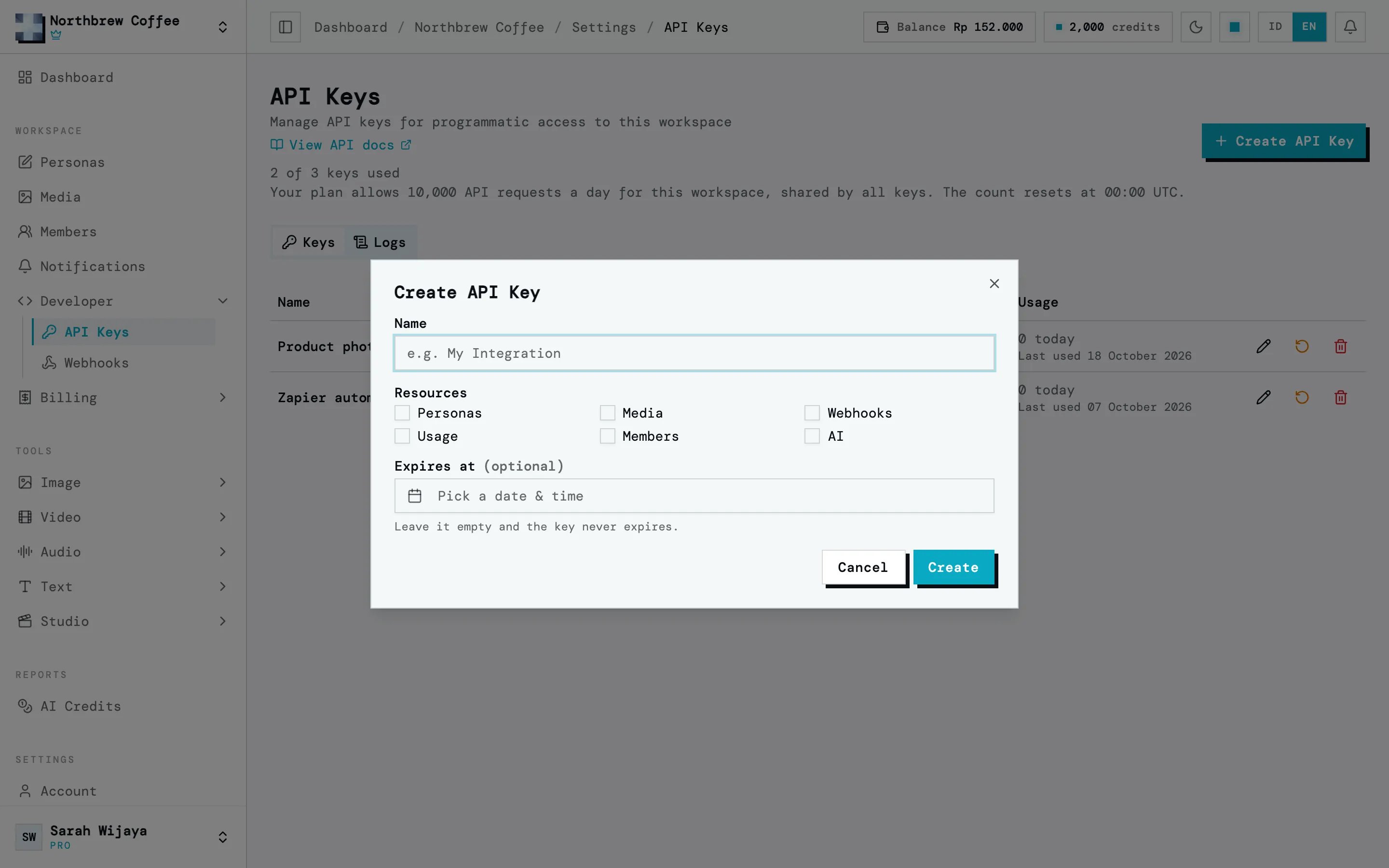
Give it a name you’ll recognise later. It’s the only way to tell keys apart once they’re created, so “render script” beats “key 2”.
-
Tick the resources it needs. Anything your plan can’t grant is greyed out with Not on your plan.
-
Optionally set an expiry date. Leave it empty and the key works until you revoke it. You can move or remove the date later with Edit.
-
Press Create. The key appears once.
Keys look like wujud_sk_ followed by 64 characters. After you create one, the list only shows the
start of it as a prefix, like wujud_sk_7f3a…, which is enough to work out which key a log line
belongs to.
Scopes
Section titled “Scopes”A key only reaches what you ticked. These are the ones that matter in Wujud:
| Scope | What it covers |
|---|---|
| AI | Run the AI tools, price a run before it starts, and check on jobs |
| Media | List, download, upload and delete assets |
| Usage | Read-only. Plan usage and your AI credit balance |
| Webhooks | Create, edit, test and delete webhooks, and read or retry their deliveries |
| Members | List members and invitations, invite someone by email, remove a member |
The dialog also lists scopes for features Wujud hasn’t opened, like Posts, Ideas and Analytics. Leave those off.
Any scope that can change something can also be given read only: tick the scope, then switch on
Read only under Access. The key can then list and fetch, but anything that creates, changes
or deletes gets a 403 with the code READ_ONLY_KEY. Pricing an AI run with its /estimate path
counts as a read.
Which scopes you can grant depends on your plan. Each level includes everything in the one before:
| Plan | Keys | Requests per day | Adds |
|---|---|---|---|
| Free | 1 | 100 | AI, Usage |
| Starter | 1 | 200 | Media, Webhooks |
| Creator | 1 | 1,000 | — |
| Pro | 3 | 10,000 | Members |
| Agency | 5 | 50,000 | — |
If you move to a plan with a lower level, your keys keep working. The scopes the new plan doesn’t include just stop being honoured, and the edit dialog marks them Kept from a previous plan. Move back up and they work again.
Workspace members only see this page if they’ve been given the API Keys permission. Resetting and revoking stay with the owner, since both can break an integration that’s already running.
Using the key
Section titled “Using the key”Send it as a Bearer token in the Authorization header. The API lives at
https://api.wujud.app/v1.
curl https://api.wujud.app/v1/me \ -H "Authorization: Bearer wujud_sk_your_key_here"An X-API-Key: wujud_sk_your_key_here header works too. Pick one, there’s no difference.
/me is the useful first call: it tells you which workspace the key belongs to and which scopes it
holds, without needing any scope itself.
With the AI scope, a text to speech run looks like this:
curl -X POST https://api.wujud.app/v1/ai/audio/tts \ -H "Authorization: Bearer wujud_sk_your_key_here" \ -H "Content-Type: application/json" \ -d '{"text": "Selamat pagi, ini Wujud.", "voice": "Kore"}'AI endpoints answer with 202 and a jobId rather than the finished result. Poll
GET /v1/ai/jobs/{jobId} until status is COMPLETED or FAILED. To price a run first, POST the
same body to that tool’s /estimate path, like /v1/ai/audio/tts/estimate, which spends nothing.
The full endpoint list, with the scope each one needs, is in the API reference.
One thing a key can’t do is manage API keys. Creating, resetting and revoking them all need a signed-in user, so a key can never mint another key.
Rate limits
Section titled “Rate limits”A request has to fit two limits.
Daily, per workspace: every key in the workspace draws from the same pool (see the table above),
and the count starts again at 00:00 UTC. Every response carries X-RateLimit-Limit,
X-RateLimit-Remaining and X-RateLimit-Reset. Go past it and you get a 429 with
DAILY_LIMIT_REACHED and a Retry-After header.
Per minute, per key:
| Kind of request | Per minute |
|---|---|
| Reads, including polling a job | 600 |
Pricing a run (/estimate) |
60 |
| Uploads | 30 |
| AI generation | 10 |
Generation is the tight one, because every job spends credits. If you’re batching, put a small delay between jobs.
Retrying safely
Section titled “Retrying safely”If a POST times out, you can’t tell whether Wujud got it, and sending it again might run the job
twice. An Idempotency-Key header fixes that. Use any unique string up to 255 characters.
- Sending the same key with the same body within 24 hours gives you the first response back, with an
Idempotent-Replayed: trueheader, and nothing runs twice. - The same key with a different body gets a
422. - If the first request is still running, a repeat gets a
409. Wait a moment and try again. - Server errors (
5xx) and rate-limit responses aren’t stored, so you can retry those with the same key.
Request logs
Section titled “Request logs”The Logs tab lists every request made with the workspace’s keys: when, which key, the method and endpoint, the status, how long it took and the IP. Only those details are kept, never what was sent or returned. Entries are kept for 1 day on Free, 3 on Starter, 7 on Creator, 30 on Pro and 90 on Agency.
Rotating and revoking
Section titled “Rotating and revoking”- Edit changes a key’s scopes and expiry without changing the key itself.
- Reset issues a new key for the same row. The old key stops working immediately. Use this if a key leaks.
- Revoke deletes the key for good.
When it doesn’t work
Section titled “When it doesn’t work”missing API key: no key reached us. Check the header spelling, and that a Bearer token has the
word Bearer and a space in front.
unauthorized: invalid api key: the key is wrong, or it was reset or revoked.
unauthorized: api key expired: its expiry date has passed. Edit it and move the date.
A 403 mentioning the resource: the key doesn’t hold that scope. Edit it and tick the resource,
if your plan allows it.
“the … scope is not enabled on your plan”: the key holds the scope, but your plan doesn’t cover it, usually after a downgrade.